The cheapest maintenance you'll ever do.
Up to 80% of bearing failures are lubrication-related. RelOnion's Lubrication Manager turns a routinely neglected task into a structured, QR-verified, fully-tracked program — because a few grams of grease is the best reliability investment you can make.
Cut bearing failures
Structured, on-time lubrication is the single highest-impact reliability practice for rotating equipment.
Prevent, don't react
Lubrication is the front line of condition monitoring — done right, you catch problems before they become failures.
Proof of work
Every lube event is logged against the asset. Audit-ready, compliance-ready, and ready to prove improvement.
What the Lubrication Manager does
A complete closed loop — plan the route, walk the route, verify each point, and log every drop.
Recurring lube routes
Build lube rounds that repeat on any schedule — daily, weekly, monthly. Each route is an ordered list of service points a technician walks in sequence.
QR-verified service points
Scan a QR code on the asset to confirm you're at the right point. No guesswork, no skipped points, no pencil-whipped checklists.
Grease & oil tracking
Every service point knows its lubricant, quantity, and interval. Log what you applied — consumption rolls up to parts and stock automatically.
Schedule templates
Turn one well-built route into a template. Clone it across similar assets or plants in seconds.
Route progress bars
Watch a route fill in as points are completed. Pending, in-progress, and done are always visible to planners and managers.
Full service history
Every lube event is logged against the asset — date, technician, lubricant, quantity, and notes. Audit-ready by default.

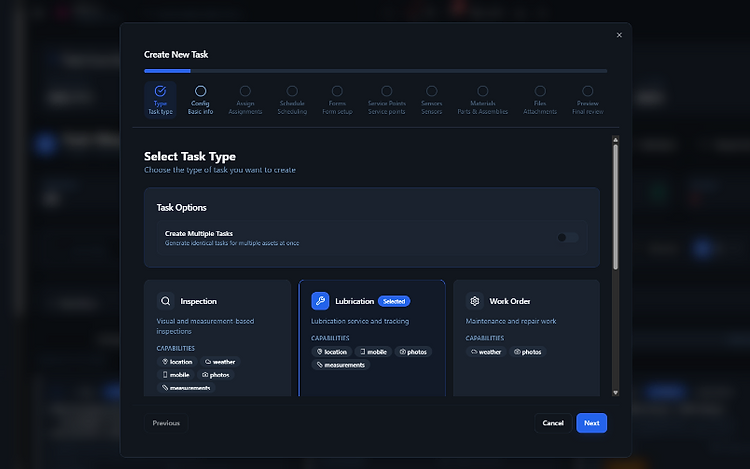
Create a lubrication task
Pick Lubrication as the task type and walk through a guided flow — Type, Config, Assign, Schedule, Forms, Service Points, Sensors, Materials, Files, Preview.

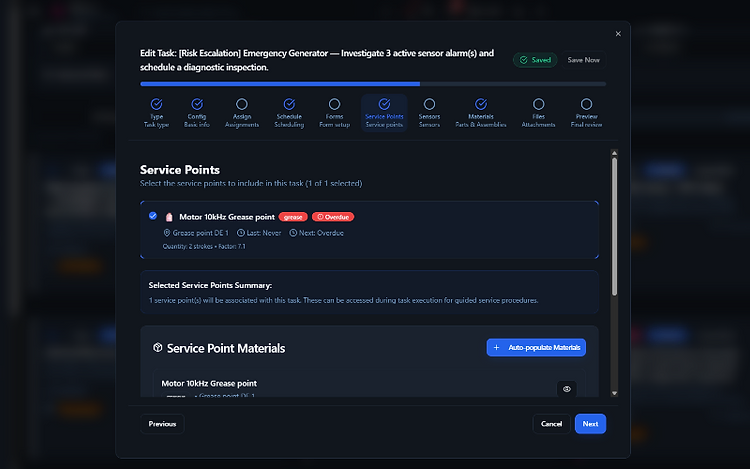
Service points on the task
Select the service points to include in the task. Each point shows lubricant, quantity, factor, last/next service, and overdue status.

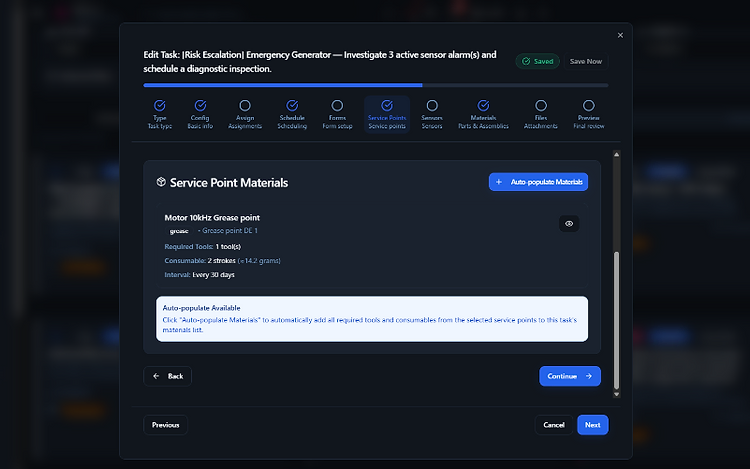
Auto-populate materials
One click pulls every required tool and consumable from the selected service points into the task's materials list — no manual entry.

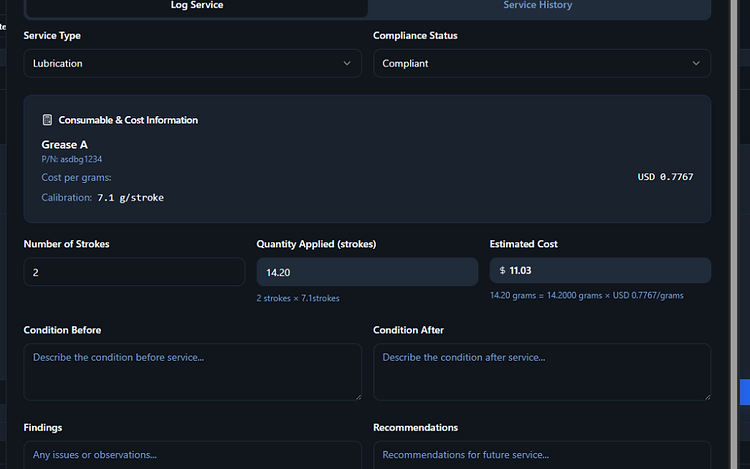
Log a service event
Record strokes, automatically calculate grams and cost, set compliance, and capture condition before/after plus findings and recommendations.

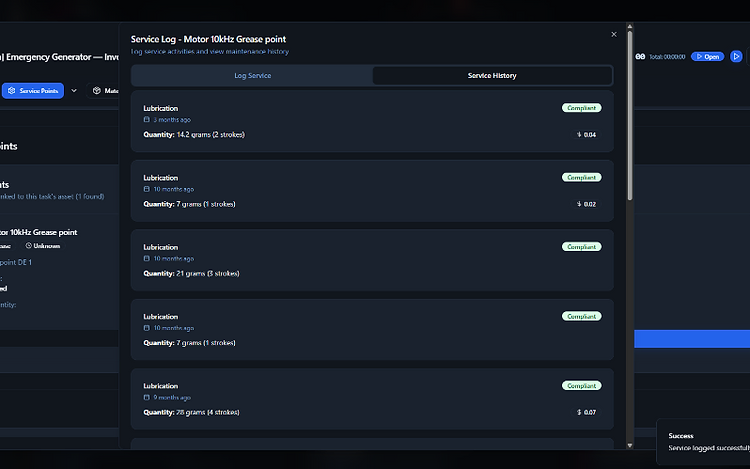
Service history per point
Every lube event is logged against the point — date, quantity, strokes, cost, and compliance status. Audit-ready by default.
The whole lube route in your pocket
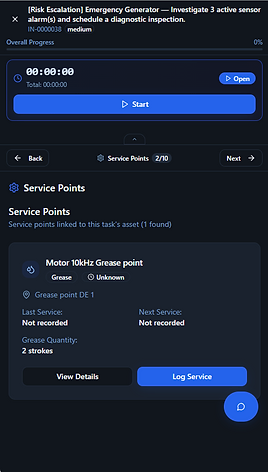
Technicians walk the route on mobile — open the task, see its service points, and log each one with strokes, grams, and cost calculated automatically. Timer running, progress tracked, offline-capable.
- Guided step-by-step service points
- QR scan to open a point
- Auto-calculated grams & cost
- Works offline, syncs when reconnected

Service point types
One route can carry every kind of point — lube, sample, and inspection together.
Grease points
Bearings, pins, and joints — nlgI number, grease type, and grams per shot.
Oil points
Gearboxes, reservoirs, and hydraulics — oil grade, volume, and change interval.
Sample points
Oil sampling locations tied to your condition-monitoring lab workflow.
Inspection points
Visual checks that ride along the lube route — look, listen, feel.
Right lube, right tool, right point — impossible to mismatch
Every lubricant, tool, and service point carries a color and a symbol code. In a lubrication task, all three must share the same code — the system blocks the task from completing if they don't. No mixed lubricants, no wrong grease in the wrong bearing, no guessing on the floor.
- Each lubricant, tool, and service point is tagged with a color and a symbol code
- A task only completes when lubricant, tool, and service point codes all match
- Mismatched codes are blocked — no cross-contamination of lubricants
- Codes are set once on the asset and inherited by every task and route
Lubrication usage, tied to asset reliability
Every lube event rolls up into per-asset statistics — consumption, cost, compliance, and intervals — and trends against failures and health, so you can see whether your lubrication program is actually improving reliability.
- Consumption and cost per asset, lubricant, and point over time
- Compliance percentage — on-time vs. overdue lubrication
- Lubrication events plotted against failures and MTBF
- Reliability trends: does better lubrication mean fewer breakdowns?

Stop skipping the lube route.
See how RelOnion makes lubrication structured, verifiable, and impossible to forget.
Book a Demo